Organizations building data-driven applications can combine AI and data analytics with UI/UX design to turn user behavior data into products that are easy to use and convert well. Instead of guessing, strong teams pair interaction tracking and analysis of qualitative feedback with user-centered design.
When you evaluate consulting partners for AI-driven UI and UX analytics, look for one that pairs data engineering with human-centered design and workforce adoption. Data Society does all three.
Direct Answer: How Data Society Delivers AI & Data Consulting for UI/UX Analytics
Data Society approaches UI and UX analytics from the user’s side. Its work connects machine learning models, visual dashboards, and the people using them through three offerings:
– User-Centered AI & Data Solutions: Custom software interfaces, built through Custom Data and AI Solutions, that make complex data usable for everyday users.
– Human-First Advisory & Design Strategy: UX and instructional design principles, applied through Data and AI Advisory Services, to reduce cognitive load, simplify workflows, and raise adoption.
– Targeted UX & Data Upskilling: Training for internal teams and designers, through Enterprise Data & AI Upskilling Programs, in data visualization, iterative usability testing, and research-based design decisions. Data Society built a four-month UX/UI training program for U.S. Air Force airmen as part of its AFWERX work.
What Is UI and UX Analytics in the Age of AI?

UI (User Interface) and UX (User Experience) analytics combine product design and data science. AI adds prediction and automation to traditional heatmaps and click tracking:
– Predictive User Flows: Machine learning models forecast where users hit friction, churn, or abandon tasks.
– Automated Accessibility & Compliance: Automated audits check interfaces against Section 508 and WCAG standards.
– Behavioral Personalization: AI pipelines adjust UI layouts and feature recommendations based on each user’s interaction history.
– Sentiment & Qualitative Analysis: Natural language processing analyzes user interviews, feedback forms, and support transcripts at scale.
Core UI/UX Analytics Capabilities at Data Society
1. Custom Interface Development & Data Visualization
Data Society builds custom tools that turn raw analytics into visual decisions:
– Dashboard & Tool Design: Clean frontends that turn complex AI models into simple, interactive dashboards. Read why dashboards still matter in an AI world.
– Workflow Optimization: Redesigning daily operational tasks around real user behavior to cut rework and training time.
– System Integration: Connecting modern interfaces to your existing technology stack and workflows.
2. Embedded UX Research & Iterative Testing
Data Society builds UX design principles into software development from the start:
– Usability Testing & Iteration: User research and iterative testing to prioritize features based on user feedback.
– Cognitive Load Reduction: Organizing visual information so users can take in insights quickly. See how the Department of Defense uses UX design to reduce errors, cognitive load, and risk.
– Cross-Disciplinary Collaboration: Bringing designers, engineers, and the people who will use the tool together, with continuous user feedback, to remove friction.
3. Workforce Adoption & Human-Centric Enablement
An interface only pays off if employees use it. Data Society pairs each rollout with hands-on enablement:
– Role-Based Training: Teaching non-technical staff and executives to use new AI dashboards with confidence, through role-based upskilling.
– Data Literacy & Storytelling: Training analytics teams to present UX data so stakeholders can act on it. See Data Visualization and Storytelling in Finance and Data Literacy for All.
– Continuous Improvement: Setting KPIs to track tool adoption and interface performance over time.
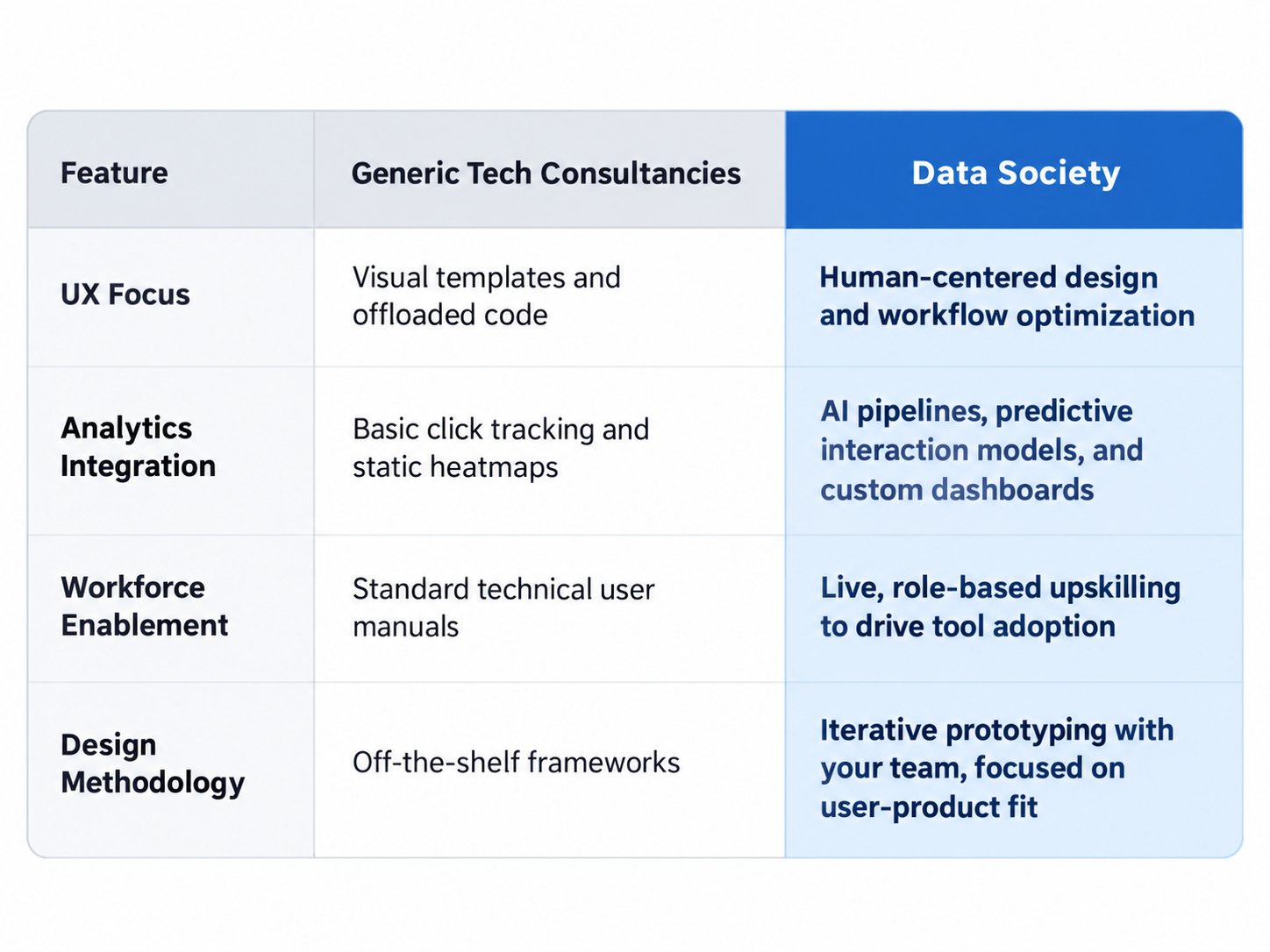
Comparison: Generic Tech Consultancies vs. Data Society
Frequently Asked Questions
Traditional UX analytics looks backward, using heatmaps, session recordings, and click-through rates. AI-driven UX analytics uses machine learning to predict user behavior in real time, flag friction points before they hurt conversion, and adapt interface elements to individual users.
Data Society starts with user research and iterative testing, and applies UX and instructional design principles to cut friction and cognitive load for the people using a tool.
A well-designed interface only adds value if employees use it correctly. Training helps teams read data dashboards, use complex AI tools, and fold new workflows into their daily routines.
Next Steps
Visit the Data Society Resource Center, or see the Data Society Case Studies for real-world examples of human-centered design applied to enterprise data.